 Powerful & Affordable Learning Management of SCORM™-compliant Content
New in Version 6
- Adds new Division level that is a grouping of organizations. Courses and Classes can be assigned at the Division level.
- Optional Security Questions for resetting your password.
- Supervisor Administrators/Reporters can be assigned at the Organization or Division level as well as configuring the supervisor's direct reports.
- Adds 49 new reports/graphs.
- New Audio and Video lessons. Link directly to the media file and Tracker provides all SCORM communication. Optionally play in HTML 5 when supported and revert to Windows Media Player otherwise.
- Additional lesson settings to skip bookmarks/suspend data, set the maximum number of lesson attempts, or end access after completion.
- Greatly improved Windows Authentication.
- Ability to "skin" the interface through jQueryUI.
- Automatically saves your last report/graph selected.
- Special "External Mode" for integrating Tracker.Net into another system.
- Redesigned and improved Global Settings screen.
- Settings to hide inactive classes, courses, lessons, and/or students in the Administrator or Reporter.
- Improved interface that is easily accessible from mobile devices.
- Updated Tracker Reporter
application allows users to view 109 reports and 118 graphs by student, lesson,
course, class, organization, and division.
-
Scheduler
application can now send division emails as well as organization/course/class emails.
Any student information such as username and password can be included.
- Updated and expanded Tracker Reports SQL Server Reporting Services solution boasts 101 reports and 125 graphs by student, lesson,
course, class, organization, and division.
-
Downloadable trial version
- Much more!
View Features Added in Version 5 
New in Version 5
- Adds graphs for the first time. There are a total of 92 graphs: 14 student, 18
lesson, 19 course, 21 class, and 20 organization.
- New and redesigned reports featuring drill-downs and popup certificates. There
are a total of 97 reports: 23 student, 17 lesson, 24 course, 14 class, and 19
organization.
- Reports and graphs can include multiple students, lessons, courses, classes, or
organizations at a time.
- Reports can now be saved to PDF, Word, or Excel.
- Ability to sequence courses.
- Can limit access to courses on a particular date, once completed, or X days
after first use.
- New Termination Date
for students for only allowing access to the system for a fixed amount of time.
- Updated Tracker Store
offers the ability to extend the Termination Date as well as email
username/password to users.
- Ability to set the status, times, score, etc. for multiple students at once.
- New interface for selecting which reports you want included by category.
- Match certificate graphics to organization, lesson, course, or class.
- Choose individual lessons, courses, and classes to produce Continuing Education
Unit (CEU) certificates.
- Choose "filter" or "search box" interface for Administrator and Reporter
screens.
- Can optionally persist the filter or search box information between sessions.
- Highly-optimized SCORM communication that dramatically reduces delay when
exiting lessons.
- Option to hide correct answers in student reports.
- New Tracker Reporter
application allows users to view 86 reports and 92 graphs by student, lesson,
course, class, and organization.
-
Scheduler
application can now send organization emails as well as course/class emails.
Any student information such as username and password can now be included.
- Can choose to display lessons in a frame rather than a popup window. This
avoids popup blocker issues as well as gives the e-Learning developer more
control on exit behavior.
- Ability to organize "Open Enrollment" courses into a Catalog.
Users can then choose which course(s) to add to their "My Courses" screen.
View Features Added in Version 4
New in Version 4
- Set course and lesson status via Administrator.
- Support of offline lessons.
-
My Courses
screen updates status without the need to refresh.
- Optional "Lesson Update Message" when lessons information successfully
received.
- New Report Viewer
reports in addition to standard tabular reports.
- 14 New Reports.
- Ability to email and save certificates to HTML.
- New Scheduler
application for sending course/class emails based on student status.
- Dramatically faster Administrator operations.
- New Tracker Store
e-Commerce site for courses and classes.
- Improved Student Import Utility.
- Ability to set students, courses, and lessons to inactive.
- Support for Windows Authentication.
- Various new settings like the ability to match graphics to organizations, the
ability to set email credentials, the option to count failed lessons
toward course completion, and more.
- Support of up to 10 simultaneous languages.
- Ability to discard interaction data and lock lesson status once completed.
- Ability to run lessons on other web sites with the optional Remote Tracker
product.
View Features Added in Version 3
New in Version 3
- Fully multilingual with simultaneous support of six languages.
- Supports Internet Explorer™, Firefox™, Chrome™, and Safari™ browsers.
- Supports the SCORM&153; 2004 Runtime Environment.
- View or email reports as Microsoft®
Word, Microsoft Excel, or HTML.
- Send students notification emails when they are assigned a course.
- User-configurable Alert, Critical, and Expired status.
- New My Courses
interface options.
- Filter courses and lessons by status or keyword.
- Assign courses and classes by organization.
- Improved password-changing options.
- Ability to customize and close lesson window.
- Many new reports.
- More notification email options.
- Required course completion dates.
- Notification messages for individual courses, lessons, and classes.
The Problem:
Organizations around the world need to manage e-Learning. The leading standard for the communication between the content and the Learning Management System (LMS) is the SCORM Runtime Environment. Tracker.Net applies the awesome power of ASP.NET and Microsoft® SQL Server™ to this task. Come join customers like Circle K, British Airways, Syncrude Canada, YMCA of the USA, Long Island Rail Road, American Signature, Mac's Convenience Stores, L-3 Communications, St. Francis Healthcare, Copenhagen Airports, Drug Free Business, various government agencies, and many more!
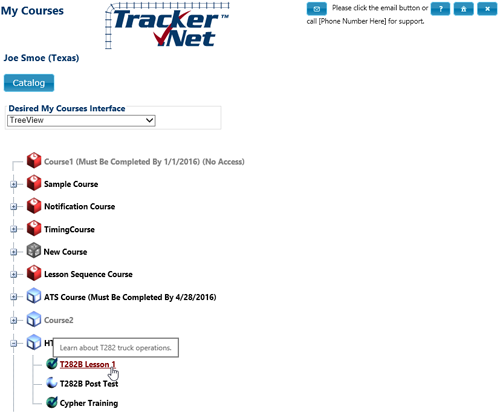
My Courses Screen
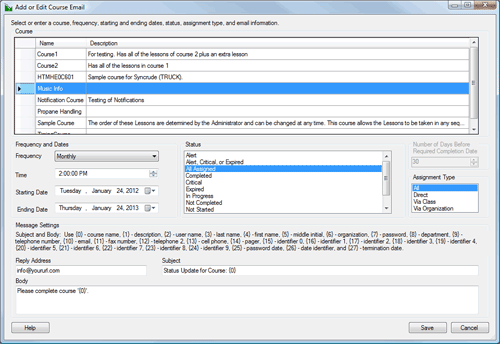
Tracker Scheduler Application

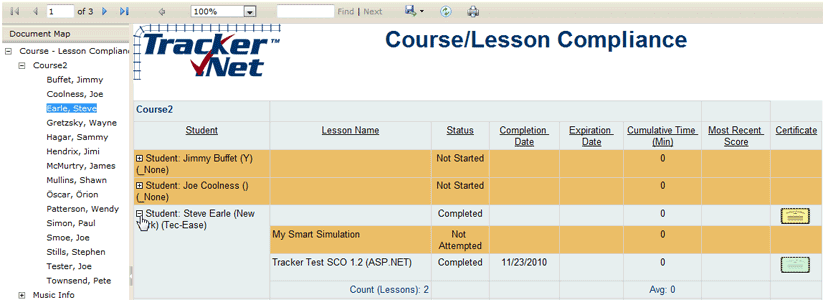
Tracker Reporter Application
The Solution:
Tracker.Net implements all mandatory and optional communication elements listed in the SCORM 1.2 and 2004 Runtime Environment Specification. Rather than messing with SCORM manifest files, you use Tracker.Net's Administrator interface to define lesson locations, organize lessons into courses, set passing scores, and more. You can even set lesson and course completion status via the Administrator in addition to having it set automatically via SCORM. Tracker.Net manages ToolBook HTML, Flash, Dreamweaver, Lectora, Captivate, ASP.NET, and any other content that can communicate via SCORM.
System Requirements:
Web Server
- Internet Information Services (IIS) 5.0 or later
- Windows® Server 2003 or later
- .NET Framework 4.5 (runtime)
Database
- Microsoft® SQL Server™ 2000 or later
Browser
- Internet Explorer 7 or later
- Newer versions of Firefox, Safari, and Chrome. Not tested with other browsers but we encourage you to try them yourself.
Client (Only for those users running the Tracker Reporter™, Tracker Scheduler™,
Tracker Student Importer, and Tracker Configuration applications)
- Windows Vista SP2 or later
- .NET 4.5 Runtime (added if needed by the installation)
Price
Despite its great capabilities, Tracker.Net continues
to be one of the lowest prices of any major LMS. Newer data is not
regularly published, but check out Brandon Hall Research's 2005 LMS prices at http://www.vbtrain.net/documents/jan5-05.htm. You'll notice that the
low prices in the Brandon Hall report include both the Tracker.Net licensing and the additional technical support costs!
These prices have gone up only $2,000 since this report.
Tracker.Net
| Description |
Price
|
| Up to 500 Users (single web site) |
$6,995 |
| Up to 2000 Users (single web site) |
$8,995 |
| Unlimited Users (single web site) |
$10,995 |
Note that you can move between levels at any time by paying
the difference in licensing costs.
Supporting Applications
| Description |
Price
|
| Tracker Reporter Application (per user) |
$495 |
| Tracker Scheduler Application (per user) |
$495 |
| Tracker Store e-Commerce Site (per web site) |
$995 |
| Remote Tracker for hosting remote lessons (per web site) |
$995 |
| Tracker.Net source code for internal use |
$4,995 |
| Tracker Store source code for internal use |
$795 |
Technical Support
| Description |
Price
|
| One year email-only technical support |
$795 |
Try It Out
Run Tracker.Net
Feel free to add yourself as a new student. You will then see all the courses configured as "Open Enrollment." If you would like to see some existing data, you can use:
user name: demo
password: a
Please send any comments, questions, problems, or feature requests to:
tracker@plattecanyon.com
Click
to see a January 2006 article in Aerospace International magazine to
shows how Platte Canyon reseller IDC Training Solutions has used Tracker.Net to
manage their aviation content for British Airways, CityJet, and other airlines
Tracker Reporter Video
Tracker Scheduler Video
Comments
-
As always, thank you in advance for your excellent support of a terrific product.
-
For a low budget alternative, I strongly recommend Tracker.Net as the LMS. A simple setup, easy to learn how to use, and I have not found any flaws in its SCORM abilities with regards to ToolBook content deployment.
-
I browsed through the demo quickly and I like a lot of what I saw. The Globals section in tabs is a really nice user-friendly piece
-
After much research we decided that Tracker.Net was by far the “best bargain” for Learning Management System. Easy to install and setup – the software has been running without problems for six months now. Works very fast with various media – more features than we will probably ever use. You don’t have to be an IT professional to manage this LMS. When I do something stupid, the always friendly support from Platte Canyon gets it fixed immediately
-
I am becoming a bigger fan of Tracker.Net by the minute.
-
Thanks for delivering such a fantastic product and being responsive to the needs of the user community.